Marian Central Class of '86 Reunion
Celebrating 40 Years
Celebrating 40 Years
Saturday, October 3rd, 2026
Woodstock Country Club
Event Details
Join us on Saturday, October 3rd, 2026 🔹 6:00 PM - 11:30 PM
🌟Reconnect, Reminisce, Celebrate🌟
🌟Reconnect, Reminisce, Celebrate🌟
Join us for a memorable evening as we celebrate 40 years since our high school graduation. We look forward to a night of shared conversation, laughs, and memories of a time that feels like both "ages ago" and "just yesterday".
The night will be filled with:
🔹 Hearty appetizers for grazing and mingling throughout the night (rather than a formal sit-down dinner)
🔹 Cash bar 🍻 with your favorite drinks
🔹 Celebration cake 🎂 to mark our 40-year milestone
🔹 Your favorite 80s tunes 🎶 for dancing and perhaps a spontaneous sing-along 🎤
🔹 Plenty of time for reminiscing, connecting with classmates, and making new memories
🔹 An activity or two to break the ice and bring back the spirit of our class...and the spirit of the 80s
What should I wear? Dressy casual...from 👖 to 👗. Come as you are. Wear what makes you feel comfortable and ready to enjoy a night of good food, great music, and the chance to make new memories with the friends who shared some of your most formative years. Our goal is that this reunion is for everyone to have a relaxed and fun time.
Please help spread the word by sharing this website!
We can't wait to see you!
The night will be filled with:
🔹 Hearty appetizers for grazing and mingling throughout the night (rather than a formal sit-down dinner)
🔹 Cash bar 🍻 with your favorite drinks
🔹 Celebration cake 🎂 to mark our 40-year milestone
🔹 Your favorite 80s tunes 🎶 for dancing and perhaps a spontaneous sing-along 🎤
🔹 Plenty of time for reminiscing, connecting with classmates, and making new memories
🔹 An activity or two to break the ice and bring back the spirit of our class...and the spirit of the 80s
What should I wear? Dressy casual...from 👖 to 👗. Come as you are. Wear what makes you feel comfortable and ready to enjoy a night of good food, great music, and the chance to make new memories with the friends who shared some of your most formative years. Our goal is that this reunion is for everyone to have a relaxed and fun time.
Please help spread the word by sharing this website!
We can't wait to see you!
Location
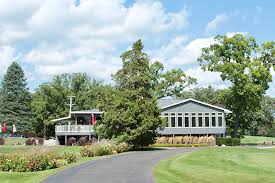
Woodstock Country Club
10310 Country Club Rd. Woodstock, IL 60098
10310 Country Club Rd. Woodstock, IL 60098

Date & Time
Saturday October 3, 2026
6:00 PM - 11:30 PM
6:00 PM - 11:30 PM
RSVP
When you click the red RSVP button below, the first question you'll see is:
"How many guests are you bringing with you?"
Respond 0 if you're coming solo...or 1 if you're bringing a guest.
You'll then enter your contact information (plus your guest's contact info.), followed by a text box with the question:
Planning to join us? YES / Maybe / No
Please enter the option that best describes your current plans. Even if you're not ready to purchase your ticket right now, we appreciate every RSVP (even if it's a "Maybe"), as it helps us better plan the event.
Note: You can RSVP "YES" without any payment required at this time.
After you submit your response, you'll see a "Thank you" message and a blue button to "Print My Ticket(s) Now". You can ignore this button...no need to print or save your tickets.
(You can also ignore the ticket(s) at the bottom of your confirmation email.)
Once we receive your ticket payment, we'll add your name to our list of "Paid" attendees.
Once we receive your ticket payment, we'll add your name to our list of "Paid" attendees.
You'll just check-in at the door...no physical ticket or QR code needed.
Plans Change? No Problem.
If you need to change your initial response (e.g. from "Maybe" ➡️ "YES"...or "YES" ➡️ "No", etc.), the website doesn't allow RSVP'ing a second time. But, no worries! To change your initial response, just drop us a quick note at: [email protected] or use the "Contact Us" form at the bottom of this site. We'll update your response and get you on the right list.
Ticket Payment
💲 TICKET PRICING 💲
$50 per person (Early-Bird Pricing extended until AUGUST 1);
$60 per person (after Aug 1)
💫 Includes venue, food, music, and event costs 💫
We’re not offering "at the door" tickets so that we can plan food accordingly.
💸 TICKET PAYMENT 💸
$50 per person (Early-Bird Pricing extended until AUGUST 1);
$60 per person (after Aug 1)
💫 Includes venue, food, music, and event costs 💫
We’re not offering "at the door" tickets so that we can plan food accordingly.
💸 TICKET PAYMENT 💸
If you've RSVP'd “YES”, the next step is to purchase your ticket(s) using one of the options below:
📱 Venmo:
https://venmo.com/Kurt-Marunde (Last 4 digits for confirmation: 7818)
Add “Reunion + Your Name” in the note
--OR--
💸 Zelle: Send to: 847 . 910 . 7818
Add “Reunion + Your Name” in the note
You'll just check-in at the door...no physical ticket or QR code needed.
Note: all ticket purchases are non-refundable. We appreciate your understanding. If your plans change, feel free to transfer your ticket to another classmate. Just drop us a quick note at: [email protected] or use the "Contact Us" form at the bottom of this site so we can update our list.
Who's Coming...So Far
We’re already seeing familiar names — we’d love to add yours.
The list below is updated at the end of each week. New attendees are marked with a "⭐️".
PLANS CHANGED from below?
The list below is updated at the end of each week. New attendees are marked with a "⭐️".
PLANS CHANGED from below?
If you need to change your initial response (e.g. from "Maybe" ➡️ "YES"...or "YES" ➡️ "No", etc.), the website doesn't allow RSVP'ing a second time. But, no worries! Just drop us a quick note at: [email protected] or use the "Contact Us" form at the bottom of this site. We'll update your response and get you on the right list.
✅ Yes...Count me in!
⭐️ = new attendee
⭐️ Becky (Kirchner)& Ken Schweder
⭐️Jeanne (Anspaugh) & Joe Connolly
⭐️ Tim Affield
⭐️ Darcy (Dick) Kriha
⭐️ Ed & Debra Belmonte
Jean (Boerner) & Greg Bowman
John Merryman
Glen & Beth Pecoraro
Barry & Christy Chapman
Ann (Hoover) & Mike Eckstein
Joe & Jennifer Lalor
Kurt Stevens & Kathleen Beemer
Bill & Maureen Dowling
David & Tracie Fuller
Rick & Sandy Wagner
Carole (Draffkorn) & Bob Bartusiak
Jeff Hill & Jennifer (Tonyan) Hill
Kurt Marunde & Lilan (Berry) Marunde
Jodie (Bright) & Matt Meisner
⭐️ Becky (Kirchner)& Ken Schweder
⭐️Jeanne (Anspaugh) & Joe Connolly
⭐️ Tim Affield
⭐️ Darcy (Dick) Kriha
⭐️ Ed & Debra Belmonte
Jean (Boerner) & Greg Bowman
John Merryman
Glen & Beth Pecoraro
Barry & Christy Chapman
Ann (Hoover) & Mike Eckstein
Joe & Jennifer Lalor
Kurt Stevens & Kathleen Beemer
Bill & Maureen Dowling
David & Tracie Fuller
Rick & Sandy Wagner
Carole (Draffkorn) & Bob Bartusiak
Jeff Hill & Jennifer (Tonyan) Hill
Kurt Marunde & Lilan (Berry) Marunde
Jodie (Bright) & Matt Meisner
🤔 Interested / Maybe
⭐ Charlene (Norman) & Steve Anderson
Frequently Asked Questions
Where and When?
Woodstock Country Club
10310 Country Club Rd. Woodstock
Saturday, Oct. 3, 2026
6 PM - 11:30 PM
10310 Country Club Rd. Woodstock
Saturday, Oct. 3, 2026
6 PM - 11:30 PM
How do I RSVP?
Click the red RSVP button on this site.
Note: You can RSVP "YES" without any payment required at this time.
Note: You can RSVP "YES" without any payment required at this time.
How do I know if you've received my RSVP?
You'll receive a confirmation email.
(You can ignore the QR code ticket at the bottom of the confirmation email. It is not a ticket. Once we receive your ticket payment, we'll add your name to our list of "Paid" attendees. You'll just check-in at the door...no physical ticket or QR code needed.)
(You can ignore the QR code ticket at the bottom of the confirmation email. It is not a ticket. Once we receive your ticket payment, we'll add your name to our list of "Paid" attendees. You'll just check-in at the door...no physical ticket or QR code needed.)
What if I'm not sure yet if I can attend?
No problem! When you RSVP, you'll see a question:
Planning to join us? YES / Maybe / No (Please enter the option that best describes your current plans.)
Simply enter "Maybe" and we'll put you on the "Interested" list.
If your plans change later and you're able to come, just drop us a quick note at [email protected] or use the "Contact Us" form at the bottom of this site.
Planning to join us? YES / Maybe / No (Please enter the option that best describes your current plans.)
Simply enter "Maybe" and we'll put you on the "Interested" list.
If your plans change later and you're able to come, just drop us a quick note at [email protected] or use the "Contact Us" form at the bottom of this site.
How do I purchase my ticket(s)?
📱 Venmo:
👉 https://venmo.com/Kurt-Marunde (Last 4 digits for confirmation: 7818)
Add “Reunion + Your Name” in the note
or
💸 Zelle: Send to: 847 . 910 . 7818
Add “Reunion + Your Name” in the note
👉 https://venmo.com/Kurt-Marunde (Last 4 digits for confirmation: 7818)
Add “Reunion + Your Name” in the note
or
💸 Zelle: Send to: 847 . 910 . 7818
Add “Reunion + Your Name” in the note
Do I need to print or save my ticket(s) ?
After you submit your RSVP, you'll see a "Thank you" message and a blue button to "Print My Ticket(s) Now".
You can ignore this button...no need to print or save your ticket. (You can also ignore the ticket QR code at the bottom of your confirmation email.)
Once we receive your ticket payment, we'll add your name to our list of "Paid" attendees. You'll just check-in at the door...no physical ticket or QR code needed.
You can ignore this button...no need to print or save your ticket. (You can also ignore the ticket QR code at the bottom of your confirmation email.)
Once we receive your ticket payment, we'll add your name to our list of "Paid" attendees. You'll just check-in at the door...no physical ticket or QR code needed.
How can I update my RSVP?
If your plans have changed from your initial response (e.g. from "Maybe" ➡️ "YES"...or "YES" ➡️ "No", etc.), the website doesn't allow RSVP'ing a second time. But, no worries! Just drop us a quick note at: [email protected] or use the "Contact Us" form at the bottom of this site. We'll update your response and get you on the right list.
Is there an Early Bird Bonus? What's the Ticket Price?
Yes! Just submit your Ticket payment by July 1 for early bird pricing of $50 each. (Tickets are $55 each after July 1; $60 each after August 1).
What's the Ticket policy?
Because we have to reserve the venue and food minimums, all ticket purchases are non-refundable. We appreciate your understanding and support as we bring everyone back together for a memorable night. If your plans change, feel free to transfer your ticket to another classmate. Just drop us a quick note at: [email protected] or use the "Contact Us" form at the bottom of this site so we can update our list.
Can I buy a Ticket at the door?
In order to plan our food quantities, we’re not offering tickets at the door. We appreciate you purchasing your tickets in advance. Please RSVP by Sept. 19th so we can finalize our catering order.
Will I hear my favorite 80s Song?
We want you to! To share your song requests 🎶 use the "Contact Us" form below.
Feel free to come back to this site and submit your song(s) anytime -- we'd love to know what songs brings you back to this era.
Feel free to come back to this site and submit your song(s) anytime -- we'd love to know what songs brings you back to this era.
Can I share Photos?
Yes! Please feel free to share a few photos of "THEN" (high school memories)...and "NOW" a current photo of you/your family by emailing to: [email protected]
What's the attire for the night?
Dressy casual (from nice jeans 👖 to dresses 👗, and in between) Come as your are and ready to have fun!
Is there a Facebook group?
Yes. The Facebook group is primarily used for connecting with classmates. Facebook group: Search Marian Central Class of '86
You'll still want to check back to this website for any Event updates.
You'll still want to check back to this website for any Event updates.
How can I help?
If you'd like to lend memorabilia for decorating the venue...or lend a hand in any other way, drop us a line (use the "Contact Us" form below).
The biggest help right now would be if you would RSVP...and spread the word!
The biggest help right now would be if you would RSVP...and spread the word!
Where do I go for Event Updates?
This website is the official place to check for any Reunion Updates! We encourage you to check back for updates as we get closer to the date.
Who should I contact if I have any further questions?
You can use the "Contact Us" section below to submit questions or comments.
Or email us at: [email protected]
Or email us at: [email protected]
Contact Us
If you have any questions, please use the "Contact Us" form.
In particular, we'd love if you could Contact Us to:
🔹 Share Song requests 🎶
🔹 Offer a helping hand at (or before) the event
🔹 Update your RSVP, if your plans have changed
We check email periodically, so we appreciate your patience in our responses.
In particular, we'd love if you could Contact Us to:
🔹 Share Song requests 🎶
🔹 Offer a helping hand at (or before) the event
🔹 Update your RSVP, if your plans have changed
We check email periodically, so we appreciate your patience in our responses.