You’ve spent months curating the perfect event: the ideal venue, top-tier speakers and a delicious catering menu. But if a guest clicks “Register” and is met with a clunky, outdated form that fails on their phone and your hard work begins to unravel.
In 2026, the registration process is not just a utility, it’s your digital front door. It’s the guest’s first impression of your event, and if the door gets stuck, is confusing or doesn’t feel secure, they’re going to walk away before even looking inside.
As an event planner, your registration software is more than a digital guest list. It’s your 24/7 assistant that builds trust and handles the mundane tasks, so you can focus on the human experience.
The Must-Have Features for 2026
Time is your most valuable currency. The old way of managing messy spreadsheets and manual follow ups is out. To lighten your load, ensure your software includes these three non-negotiables:
1. Custom Forms with Conditional Logic
Using a custom form at registration allows you to collect more relevant information than a standard form might. Using conditional logic on forms helps to avoid ‘form fatigue’, where guests quit a registration because of too many irrelevant questions. With software like EventCreate, you can set up custom questions for specific ticket types, or another question’s response and have them applied conditionally as needed.
2. Seamless Payment Processing
Selling tickets online shouldn’t be a headache. In 2026, guests expect a secure and seamless experience. If they have to jump through even one hoop, you’ll likely lose them.
3. Functional Email Automations
Don’t waste time manually sending out welcome emails or receipts. Your software should automatically trigger professional, branded emails – no one wants to receive boring, text-only communications. Use software like EventCreate to schedule automated event reminders, program countdown timers and send announcement emails for new ticket availability.
Nice-To-Have Features for an Efficiency Boost
While you may be able to do without certain features, these “nice-to-haves” can take you from ‘surviving’ to ‘thriving’ in your event planning journey.
1. On-Site Check-Ins
Toss the printed guest lists and highlighters in the trash and switch to an app-based check-in system. This feature allows you to quickly scan tickets and check-in guests with a professional QR code scanner. Use a tool like EventCreate’s Free Check-In Kiosk for an effortless and professional check-in system.
2. Real-Time Analytics
Access KPIs at any given time for a real-time snapshot of your event’s success. Think ticket sales, revenue, conversion rates, unique visitors and page views. Everything you need at your fingertips can help you make quick, informed decisions on the fly.
3. CRM Integrations
Eliminate manual data entry in your event planning process by integrating your registration software with your CRM software like Hubspot or Salesforce.
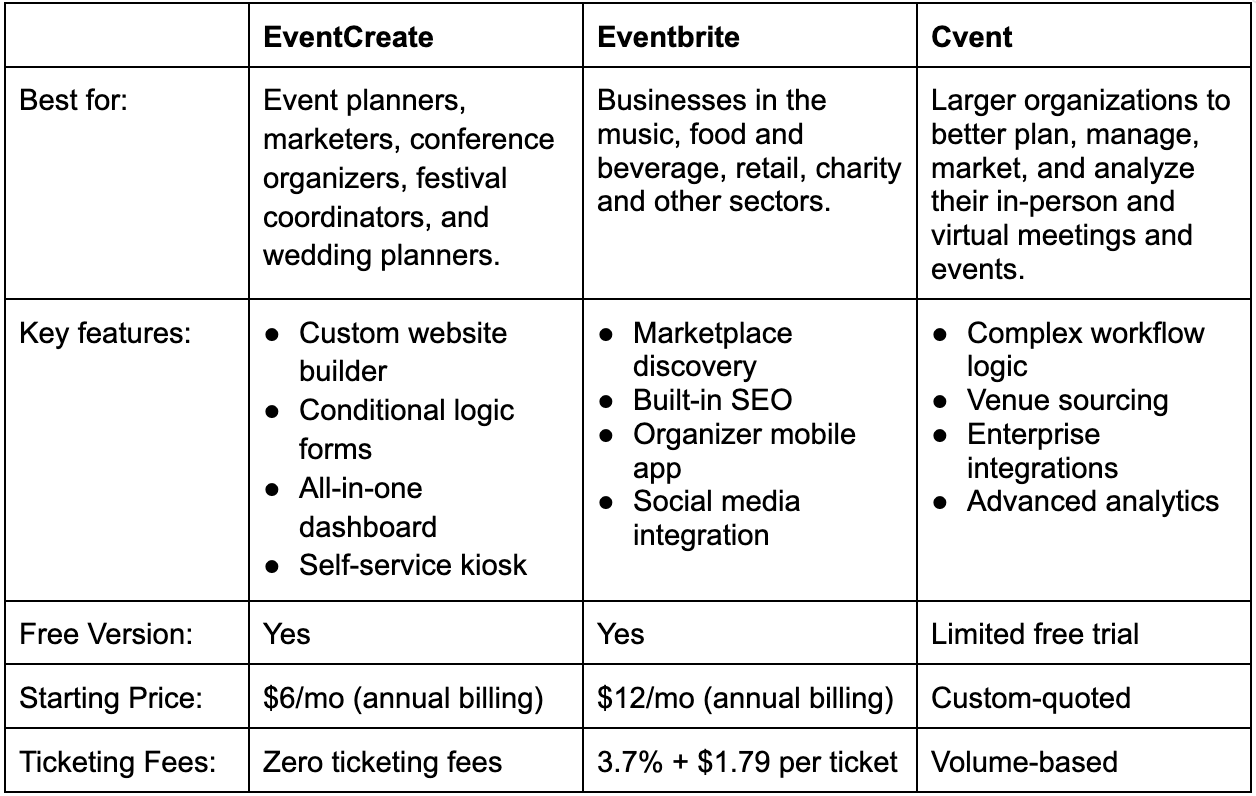
Feature Comparison
Not all software is built the same. Some prioritize simplicity, some focus on branding, while others are designed for large-scale needs. Here’s a simple comparison to consider:
Based on this comparison, it’s clear that the right choice depends less on the features offered and more on how those features align with your needs as an event planner.
Pricing Models Explained
The previous table provides a baseline, but it’s important to understand the complexity of these pricing models. There are three ways platforms can charge you:
Pay-As-You-Go → No up-front costs, but the high ticketing fees can eat away at your profits. It’s not an ideal model for small businesses.
Flat-Fee Subscriptions → You pay a set fee and keep 100% of your ticket revenue. For event planners hosting more than two to three events per year, this can add up to significant savings.
Quote-Based → These models are generally reserved for enterprises, and not ideal for small business event planners. These often involve massive set-up fees and multi-year contracts.
Security and Data Considerations
Before committing to any software, it’s important to look at the fine print regarding your data. Data sovereignty is a major factor to consider, and in 2026 that may mean some “free” platforms technically ‘own’ your attendee lists. Before you commit to a particular platform, first ensure they are:
Data Ownership: You own your lists and the software provider can’t use your leads for their own marketing.
GDPR/CCPA friendly: protects the privacy of your guests and their information.
PCI compliant: ensures secure credit card information.
How to Choose the Right Tool for Your Event
Choosing the right software is less about picking the best-rated and more about finding the right one for your event. In 2026, most event planners fall into one of the following categories:
The Creative/Small Business
You’re running a product launch, workshop or networking event. Your priorities are speed and aesthetics. You need a platform that offers a drag-and-drop website builder, like EventCreate. Your registration should be a seamless extension of your brand and not look like a generic form created in a third-party app.
The High-Volume Community Planner
You’re running frequent, community meetups and need simplicity and cost-control. You don’t want to be surprised by high ticketing fees that eat into your ticket sales margins. You need to prioritize a platform that offers a flat-fee pricing model to keep your revenue where it belongs – in your bank account.
The Efficiency-Seeking Corporate Team
You and your team are running large conferences, industry seminars and corporate training sessions. Your registration software needs to integrate well with other tools like your CRM system, so you’re not left manually uploading data when you should be focusing on your attendees.
The Power of a Test-Drive
You shouldn’t have to guess when it comes to your event’s success. Before committing to a contract, test the ‘digital front door’ for yourself before you step through to check if it fits your needs. Trying a free trial, like EventCreate offers, is often the easiest way to see if it fits your workflow.