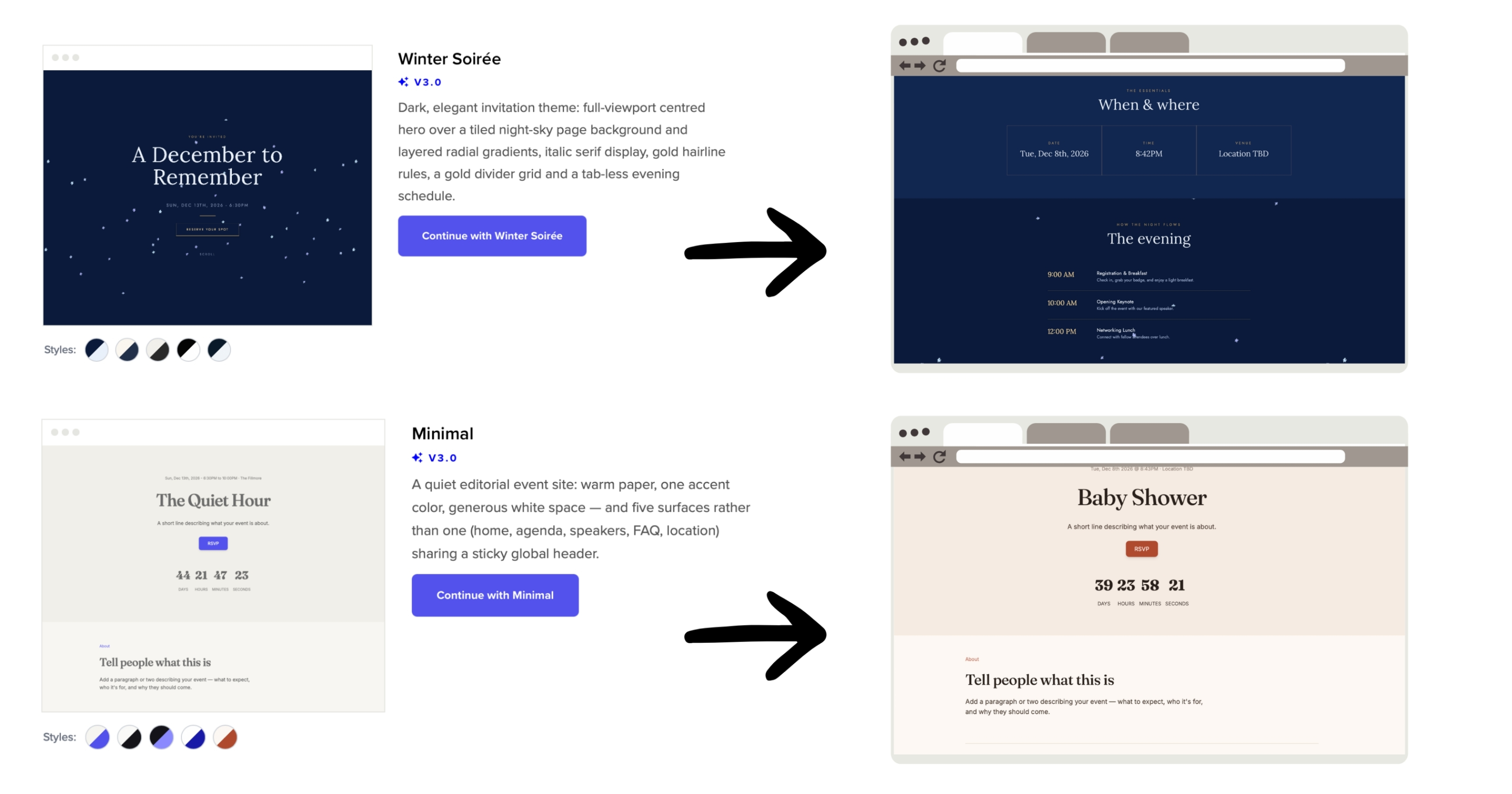
Over the past year, we’ve been hard at work collecting hundreds of editor features requests from event planners and utilizing that feedback to develop our brand new event website editor. We’re very excited to announce that the editor has now been released!
This is not a small update or a few tweaks here and there. It is a complete redesign built around one simple goal: making it easier for you to create your event website, no matter your experience level.
TLDR; our new editor allows planners to:
1. Choose from brand new, beautiful themes
2. Edit via drag and drop
3. Save logos, colors, and fronts in brand kits
4. Manage and edit images in one place
5. Update headers and footers once for every page
6. Undo and redo changes
7. Restore earlier versions with publish history
8. Never lose progress with auto save
9. Customize as much or as little as you like
10. Keep event details current with tokens
11. Start new pages from templates
12. Style your whole site at once
13. Preview on mobile and tablet
Long version, here is everything that is new, and why it matters for you.
1. All New Themes, Built for Every Event
The biggest change in this update is our completely rebuilt theme library. Themes are the heart of your event website, since they set the tone before a single word of content is even read. We wanted to give you a lineup that feels modern, polished, and ready to use right away.
Whether you are planning a wedding, a conference, a fundraiser, or a birthday celebration, you will find a theme that fits the mood you are going for. Each one comes pre-built with up to 10 different font and color combo variations, so you can preview major mood and style changes in one click. And the themes are still fully customizable, so you are never locked into a rigid design. Pick a theme you love, then make it your own with your own colors, fonts, and content.
2. Drag and Drop Editing
We know one of the biggest frustrations with website builders is not being able to create the layout you need or want. That is why the new editor is fully drag and drop and allows complex, advanced customization if needed. Click on any section, image, or block of text, and move it exactly where you want it. And don’t worry, there’s no coding required, ever.
3. Brand Kits and a Palette Generator
Design decisions can eat up a lot of time, especially if you are managing more than one event website or trying to keep things consistent with your organization's branding. Our new Brand Kits feature solves that. Save your logo, colors, and fonts once, and apply them across your entire site with a single click. No more digging through old files or trying to remember your exact hex codes.
Paired with Brand Kits is our new Palette Generator. If choosing colors that work well together has ever felt intimidating, this tool takes the pressure off. Test out different color palettes with a single click. Try one of our suggested palettes for an instant, professional look, or build your own from scratch until you land on a combination that feels just right. It is a simple way to explore your options without committing to anything until you are ready.
4. A Brand New Image Manager and Image Editor
Photos do a lot of heavy lifting when it comes to building excitement for an event. Our new Image Gallery feature makes it easy to showcase them. Upload your own photos directly, or choose from our built in image library if you need a little help getting started. Your uploads now persist across events and your account, so you can access the same files and images across your account. Our new image editor also allows for advanced cropping and styling, so you can make image tweaks without leaving EventCreate.
5. Global Header and Footer Editing
If your event website has multiple pages, you already know how tedious it can be to update something across every single one. Our new global header and footer editing feature fixes that. Update your header once, and the change applies across your entire site instantly. It is a small feature with a big impact, especially for anyone managing a larger, multi page site.
6. Undo & Redo
Creativity works best when you feel free to experiment, and we wanted the new editor to support that. With Undo and Redo, you can try something new without worrying about committing to it. If a change does not work out, undo it. If you change your mind again, redo brings it right back.
7. Full Publish History
For even more peace of mind, we added Publish History. This gives you a complete record of every version you have published, so you can look back and roll back to an earlier version anytime you need to. Your work is always protected, and you never have to worry about losing something you liked.
8. Auto Save
Every change you make in the new editor saves automatically as you go. There is no need to remember to click save every few minutes, and no risk of losing your progress if you get pulled away mid edit. It is one less thing to think about while you focus on building your event website.
9. Design Settings for Every Comfort Level
Not everyone wants to make every single design decision, and that is okay. Our new Design Settings give you the flexibility to choose your own path. If you want an easy, polished look, use our suggested font and color pairings. If you want full creative control, customize every detail to match your own brand or event theme. Either way, the choice is yours.
10. Tokenized Variables
Event details can change, and updating them page by page takes time. With Tokenized Variables, you can paste a replacement token into any text on your site, and it is replaced with your event’s live details whenever the page is viewed. For example, {{event.name}} shows your event name, {{organization}} shows your organization, and {{event.location_full}} shows the venue name followed by the street address. When you update the event, every page using that token updates too. You can copy tokens from the Replacement Tokens panel, or insert one while editing text by using the { } button in the text toolbar.
11. Page templates
Building a new page from scratch can slow down the process, so we added page templates to give you a starting point. Choose a template, replace the placeholder content with your own, and adjust the layout however you like. Because the editor is fully drag and drop, a template is just a place to begin. You can change as much or as little as you want.
12. Global style editing
A consistent look makes an event website feel more professional. Global Style Editing lets you set your fonts, colors, and button styles all in one place and apply them across your whole site. When you change a style, every page updates to match. It works alongside brand kits and palette generators, so refreshing your site’s look takes a few clicks instead of editing each page individually.
13. Mobile and tablet previewing
Many guests will visit your event website on a phone or tablet, so it helps to see exactly what they will see. Our new themes are built to be much more mobile friendly, so your site looks great on phones without any extra work on your end. You can switch between desktop, tablet, and mobile views directly in the editor. Check your layout, spacing, and images on each screen size before you publish, and make changes where you need to.
Try Our New Event Website Builder Today
This update is live right now, which means you can start exploring everything above the next time you log in. We built this editor because we wanted the process of creating your event website to feel less like a chore and more like something you actually enjoy. From the all new themes to the small details like auto save and undo, every part of this update was designed with your experience in mind.
We cannot wait to see what you build.
Thanks for building with us.
The EventCreate Team
Take a look at what's new and find the theme that fits your event!