Selling tickets is an integral part of event management.
However, many ticketing platforms charge high fees or complicate the process by requiring extra steps.
What event organizers need is an efficient ticketing solution that can handle multiple ticket types, payment processing, and fraud prevention—without unnecessary work.
By comparing some of the best event ticketing software platforms available and exploring their key features, you can ensure you choose the right ticketing solution for your next event.
Key features to look for in event ticketing software
All online ticketing platforms aren't built equally. To ensure you select ticketing software that ticks all the boxes, start by determining which features matter most.
Customizable ticket types: Prioritize support for multiple ticket tiers (e.g., early bird, VIP, group) to match pricing to demand and drive urgency.
Mobile-friendly registration: Ensure a smooth, responsive checkout experience on mobile devices to reduce drop-offs and improve conversion rates. This is essential given that 62% of web traffic is mobile.
Branded event pages: Create customizable event pages that match your brand and communicate key details.
Automated confirmations and reminders: Save time and prevent no-shows by automatically sending tickets, calendar invites, and event reminders.
Integrated payments: Support credit cards, offline payments, and digital wallets like Apple Pay and Google Pay right in your site.
On-site check-in tools: Use built-in ticketing system tools like badge printing, QR scanning, and mobile check-in apps to streamline event-day logistics.
Analytics and reporting: Rely on reporting functionality detailing ticket sales, attendee demographics, and no-show rates to get more from your online event registration and ticketing platform.
Third-party integrations: Integrate with your CRM, email tool, and marketing platform to sync data and automate follow-ups.
Access control and ticket limits: Cap registrations, restrict ticket types, and control session access to maintain capacity restrictions and enhance security.
Top event ticketing platforms compared
Each event ticketing system below can support a variety of in-person events, from nonprofit fundraisers to corporate conferences.
1. EventCreate
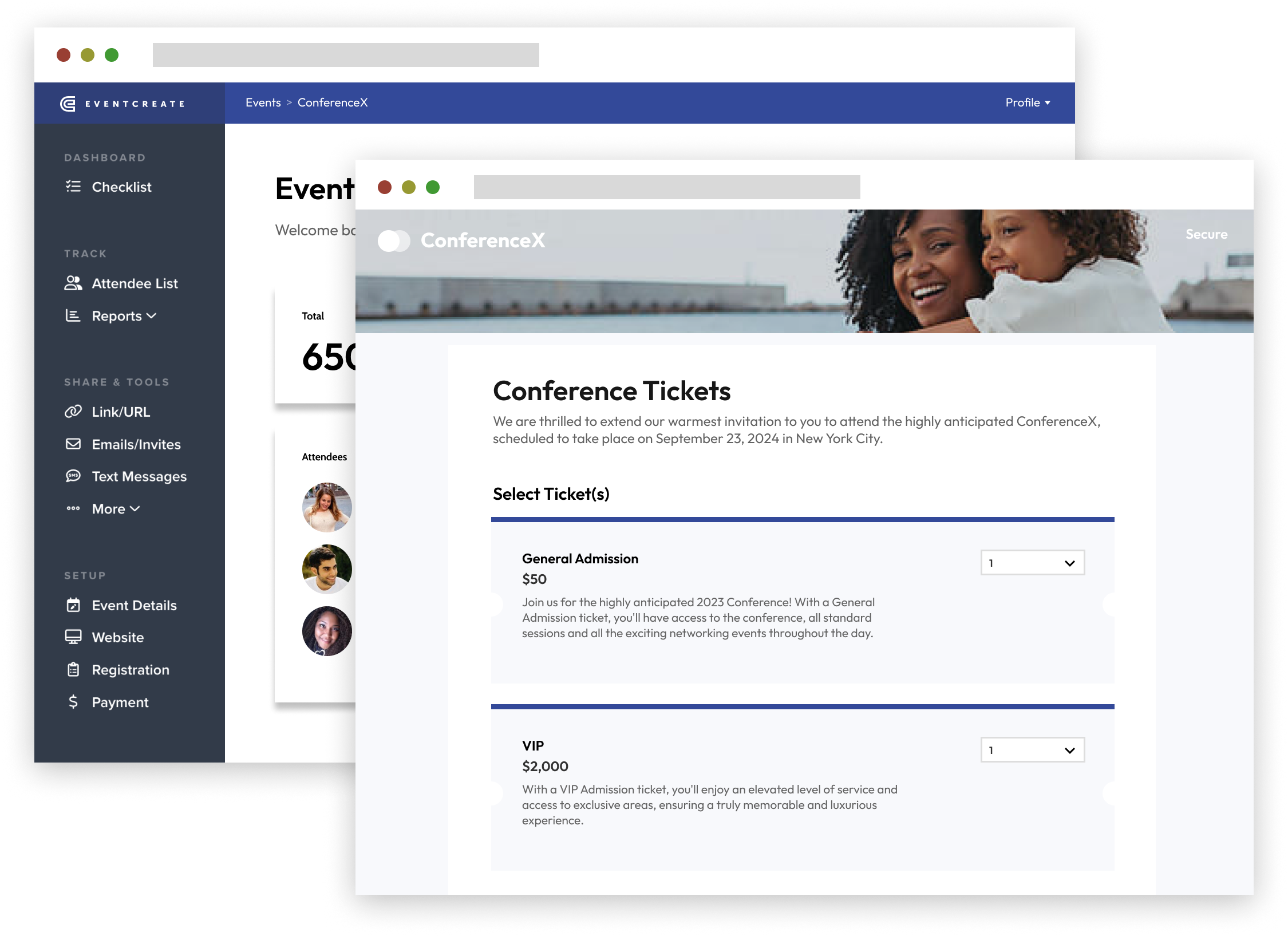
EventCreate is an all-in-one event management solution with features for putting on events of all sizes. It offers built-in ticketing, a QR code scanning mobile app, and a website page builder.
Features:
Seating charts: Help attendees find their spot quickly with our drag-and-drop seating chart creator.
Built-in ticketing: Create multiple ticketing options by setting up custom tiers for VIP or backstage passes, selling add-ons, and providing discount codes.
RSVP tracking: Send online invitations and track RSVP responses in real time.
Low ticketing fees: Avoid exorbitant processing fees to run truly free events or keep event ROI high.
Pros:
Unlike other platforms, we process payouts right away rather than holding onto funds.
EventCreate offers multiple payment methods, including integrated credit card processing and an offline payment option.
We also have an excellent customer support team—just ask these EventCreate G2 reviewers.
Cons:
EventCreate is designed for small and mid-sized event planners. Corporate organizations might find it lacking in enterprise-facing features like single sign-on.
Pricing:
EventCreate pricing starts free!
2. Purplepass
Purplepass is a flexible ticketing platform with powerful tools for custom registration, box office sales, and venue management.
Features:
Assigned seating: Create detailed venue maps and assign seating with full control over layout and pricing.
Box office tools: Sell on-site tickets using integrated POS hardware with real-time inventory syncing.
Custom registration: Collect waivers, surveys, or uploads through tailored checkout forms.
Pros:
Purplepass supports both digital and physical ticketing, including mailed tickets and thermal ticket printing.
It enables customization across event pages, registration forms, and ticketing workflows.
Purplepass offers built-in integrations with Zoom, Salesforce, and social media platforms to streamline event operations.
Cons:
Pricing:
PurplePass’s fee structure is complex. What you pay changes based on how you sell tickets, if your company is for-profit or non-profit, and whether you print tickets or provide wristbands.
For-profit companies, for example, will pay 2.5% + $0.99/ticket with additional costs for credit card processing, wristband use, and physical ticket printing.
3. Eventbrite
Eventbrite is a popular platform for finding local events. It also offers an event ticketing solution for event planners.
Features:
Flexible event payouts: Choose how often you receive payouts.
Eventbrite Organizer App: Download a dedicated Eventbrite app for monitoring ticket sales and completing on-site check-ins.
Marketing tools: Gain access to helpful event promotion tools, such as a social media advertising feature.
Pros:
Eventbrite has a highly intuitive interface, making it easy for first-time users to set up and manage events.
The platform offers strong promotional tools, including built-in email campaigns and seamless social media integration.
Users benefit from high brand recognition and built-in discoverability, helping them reach a wider audience.
Cons:
Pricing:
Eventbrite doesn’t charge to host events, but when you sell tickets, the buyer pays a fee—adding to the overall cost of their experience.
On top of the ticket price, Eventbrite charges attendees:
4. Brushfire
Brushfire is a ticketing and registration platform with a range of helpful features for paid events.
Features:
Group registration: Allow bulk registration and payment for groups, a feature ideal for team bookings.
White-label branding: Fully customize event pages with your logo, colors, and domain name for a seamless brand experience.
Ticket scanning app: Use Brushfire’s mobile app to scan tickets, validate entries, and track attendance in real time.
Custom ticket types: Enable detailed ticket configurations, including early bird pricing, add-ons, tiered access, and attendee limits.
Pros:
The platform is especially well suited to faith-based organizations, with tools for church events, retreats, and worship services.
Brushfire supports global events with multi-language and multi-currency functionality.
Cons:
The pricing structure is complex, and the platform has additional fees for features like customer support or access to the event app.
Brushfire doesn’t natively integrate with as many third-party marketing or CRM tools as competitors.
Pricing:
Brushfire has a “pay-as-you-go” pricing structure, charging:
$1.50 + 1% per paid attendee
$1 per free attendee
$1 per attendee fee for virtual events
$1 per attendee fee for attendee support, plus standard credit card processing fees
5. RSVPify
RSVPify is a modern event management platform designed for private events, corporate functions, and non-ticketed gatherings. It offers strong RSVP and guest management tools.
Features:
Integrated ticket sales: Sell paid or free tickets directly through RSVPify with support for multiple ticket types, promo codes, and ticket limits.
Custom checkout forms: Collect guest details using custom fields during the ticket purchase process.
Mobile check-in app: Use the built-in event check-in app to scan tickets and monitor attendance.
Pros:
RSVPify is ideal for events prioritizing RSVP tracking and guest control over traditional ticket sales.
The platform supports elegant, branded experiences without requiring attendees to create an account.
Its privacy features make it a strong choice for internal corporate events and VIP functions.
Cons:
Some features, like advanced customization, seating charts, or white labeling, are only available on higher-tier plans.
Pricing:
While RSVPify offers a limited free option, most event planners will need to upgrade to one of the paid plans, which start at $39 per month.
6. Ticket Tailor
Ticket Tailor is a user-friendly ticketing platform designed for event organizers seeking a cost-effective and customizable solution for selling tickets online.
Features:
Flexible ticketing options: Offer various ticket types, including general admission, reserved seating, and donation-based tickets.
Integrated payment processing: Integrate with payment processors like Stripe, PayPal, and Square to enable secure and direct transactions without additional fees.
Customizable event pages: Create customizable event pages to maintain brand consistency throughout the ticketing process.
Pros:
Ticket Tailor provides a straightforward pricing model with no per-ticket commission fees, making it a budget-friendly option for events of all sizes.
Organizers retain full control over their funds, with payments processed directly through their chosen payment gateway.
Cons:
Pricing:
Ticket Tailor has a free plan (for free events) for up to 2,000 tickets. After that, the platform charges a flat fee of $0.65 per ticket.
7. RegPack
Regpack is a comprehensive event registration and payment platform designed for organizers who need flexible ticketing, automated billing, and customizable registration flows.
Features:
Integrated ticket sales: Get support for multiple ticket types, pricing tiers, and attendee limits.
Automated billing and payment plans: Create customizable payment plans that allow attendees to pay on a schedule that works for you both.
Conditional registration forms: Tailor the registration process to individual attendees using conditional logic to ensure a personalized experience.
Pros:
Regpack supports a variety of payment methods, including credit cards, PayPal, and ACH transfers.
The platform integrates seamlessly into organizers' websites, providing a cohesive brand experience and eliminating the need to redirect users to external pages.
Cons:
Regpack supports complex, multi-step registration workflows. For small or one-off events, it can feel like overkill.
While reporting tools exist, some users note the analytics are less intuitive than those of other platforms.
Pricing:
RegPack starts at $40 per month per license.
8. Weeztix
Weeztix is a versatile ticketing platform that helps organizers sell tickets online efficiently. It offers tools for event promotion, sales tracking, and on-site access management.
Features:
Embedded ticket shop: Integrate a customizable ticket shop directly into your website to create a seamless purchasing experience for attendees.
Real-time analytics: Uncover data-driven insights through its dashboard for informed decision-making.
Pros:
Weeztix also includes some financial management features, reducing administrative burdens associated with ticket sales.
The platform supports integrations with various tools.
Cons:
Pricing:
According to Capterra, Weeztix charges around $0.94 per ticket sold.
Why choosing the right event ticketing software matters
The ticketing platform you choose doesn’t just process transactions. It's a key touchpoint that shapes the attendee experience.
Choosing a solution that goes beyond basic ticket sales is essential to creating a user-friendly and positive customer experience.
The right event ticketing software can help you:
Boost registrations: Deliver a seamless registration process that reduces friction and helps increase online ticket sales.
Save hours of admin time: Automate scheduled emails, sync attendee lists, and promote on social media to eliminate manual work during the event planning process.
Reduce no-shows: Keep your event top of mind with built-in reminders and calendar invites.
Elevate your brand: Use custom-branded pages and smooth ticketing experiences to build trust and bolster your brand's image.
Support better decision-making: Gain visibility with detailed analytics to see what’s working and fine-tune your strategy for your next event.
In short, the right software isn’t just a tool—it’s a growth lever. Choose well, and you'll get stronger engagement and better feedback to host smoother events all around.
How EventCreate simplifies ticketing and registration
Many ticketing platforms overcomplicate the process or pile on fees, making life harder for event organizers.
EventCreate removes that friction with an affordable, streamlined solution packed with practical features like:
Zero-fee ticketing for free events
Tools for creating seating charts and scanning QR-coded tickets
Instant payouts to your connected account
Support for tiered tickets, coupons, and add-ons
Fully customizable, branded event pages
Whether you’re planning a conference, festival, or corporate workshop, EventCreate is an excellent choice.
Get started for free today.