How to Track Attendance at Events: Best Methods & Top Tools
Many event organizers still rely on manual check-in processes and outdated attendance tracking tools.
Meg Breithaupt
June 03, 2026
Many event organizers still rely on manual check-in processes and outdated attendance tracking tools.
Meg Breithaupt
June 03, 2026
Many event organizers still rely on manual check-in processes and outdated attendance tracking tools. The time and effort it takes to mark attendees off using a printed list or spreadsheet increases the likelihood of data entry errors and admittance bottlenecks.
To improve the attendee experience and deepen post-event reporting and analytics, event planners need a more modern, accurate way to track attendance.
This article explores the pros and cons of different tracking methods and reviews six useful software tools to improve attendance tracking at your next event.
Accurate event attendance tracking offers event organizers several important benefits, helping them:
Strong attendance tracking helps event planners compare registrations against actual attendance to determine how well their marketing efforts worked.
For example, a high no-show rate might indicate that pre-event engagement or reminders need improvement or that you should experiment with selling tickets, even at a low cost, to increase commitment.
You can’t assess event success without knowing how many people showed up. Event attendance tracking data helps you evaluate return on investment and understand if your results justify the time and money spent.
For event organizers planning multiple events, attendance data helps identify trends, such as which sessions, speakers, or formats drew the most interest. With this information, you can refine future events to maximize attendee engagement.
Sponsors, internal teams, and clients often want proof that an event delivered value. Attendance numbers provide a concrete metric to illustrate impact.
It's important to know who attended your event before you send post-event emails, as sending “Thanks for coming” messages to no-shows is a bit embarrassing.
Detailed attendee tracking data—such as session attendance or booth engagement—can help event planners reach out to the right guests and tailor invites for future events to each participant’s interests.
Access to data points like attendance rate helps you plan logistics for upcoming events, including venue size, staff allocation, and necessary materials based on actual numbers.
For in-person events, there are three main ways to streamline event check-ins and track the number of attendees that come through the door:
QR code scanning is the most efficient way to check in attendees on-site. After registering for an event, each attendee receives a unique QR code, which is a special type of barcode that contains details about their ticket.
Guests can either print their QR code or use their smartphone to show it to gate staff, who will scan it using their event management software's mobile app. For added security and efficiency, event planners can implement additional ID checks or set up self-check-in kiosks.
QR codes are a great option as they are:
Cost-effective: Easy to implement using smartphones and basic software
Efficient: Faster than manual methods like sign-in sheets
Data-rich: Automatically linked to attendee profiles for real-time tracking
Touchless: Hygienic and efficient, especially for large events
Their main drawback is that they don’t track movement or session-level attendance, so the event data you can capture is limited.
A more advanced option is to provide each event attendee with a badge or wristband embedded with a Radio Frequency Identification (RFID) or Near-field communication (NFC) chip. These chips automatically log movements and attendance at entry points, booths, or specific sessions—no scanning required.
RFID and NFC tracking offer deep, real-time data collection, which syncs to your CRM to reduce human error. They enable more granular insight into attendance, so you can track which sessions people attend and how long they stay.
Naturally, this option has a few cons:
Expensive: Higher setup cost for hardware and tags
Privacy concerns: Constant tracking may raise attendee discomfort
Overkill for small events: Best suited to large events like conferences or festivals
Finally, there's the old-school option: manual attendance tracking, where staff check in attendees using printed lists or spreadsheets.
Manual methods are low-cost and easy to set up, but they're prone to human error, much more time-consuming, and require digitization later to enable any kind of data analysis.
Based on these drawbacks, manual event check-in methods are really only suitable for checking off event registrants as they arrive to confirm total head count.
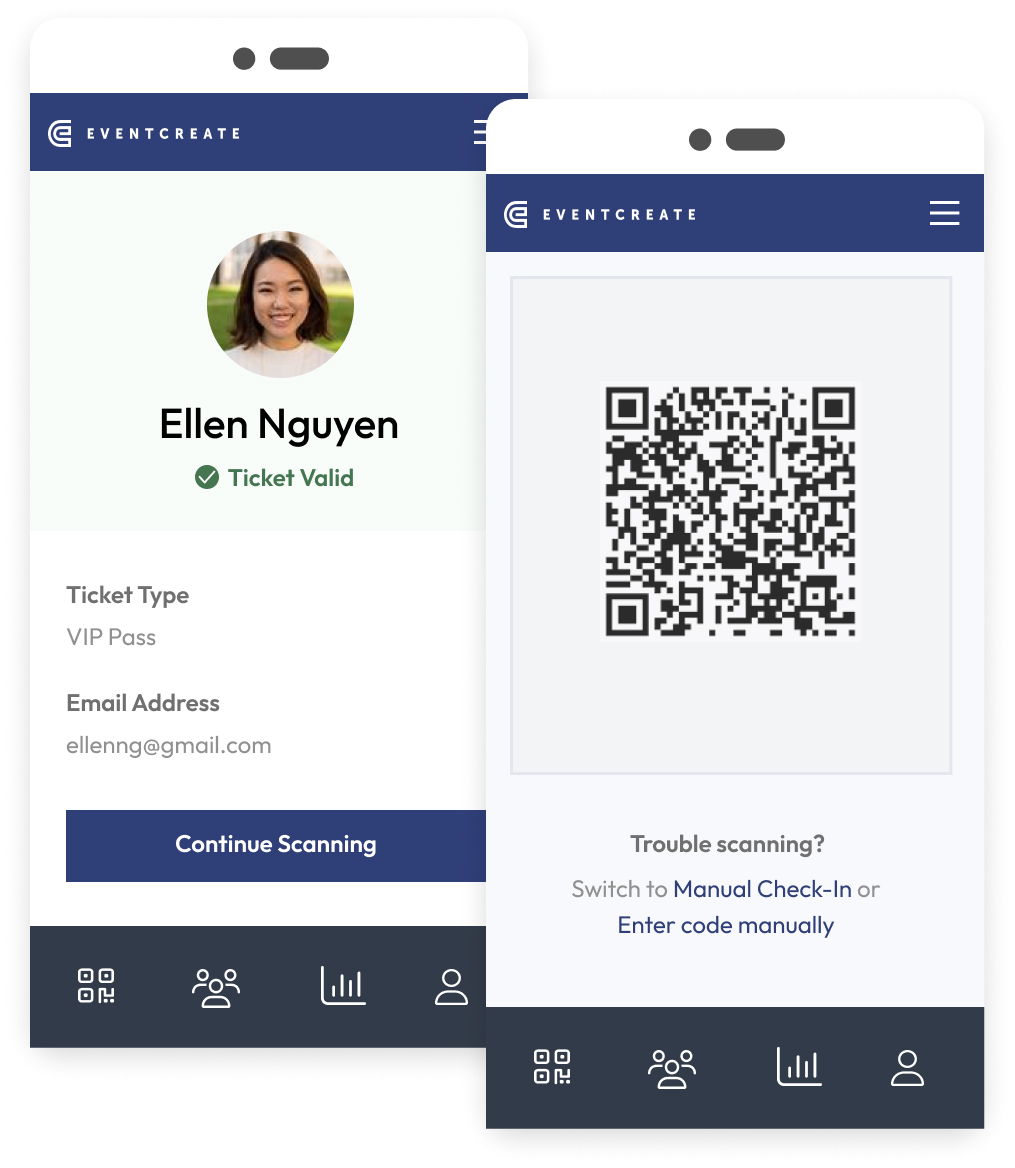
An image of EventCreate’s QR code scanning app (Image source)
EventCreate is a popular all-in-one event planning and management platform for event organizers who need mission-critical features but don't want to break the bank.
Our integrated platform offers much more than tools for tracking attendance, including online event invitations and a drag-and-drop seating chart creator.
Features:
QR-coded tickets: Every ticket sold via EventCreate has its own personal QR code for easy check-in.
Event check-in app: EventCreate comes with a free event check-in app for scanning QR-coded tickets.
Event badge printing: You can design and print name badges right from the platform, helping attendees network without the awkward “Sorry, I forgot your name.”
Real-time reporting: EventCreate's event management dashboard lets you track and manage your attendees in real time.
Custom reports: With our powerful analytics suite, you can monitor metrics like attendance, page traffic, and site conversion rate.
Pros:
EventCreate is a cost-effective solution for tracking event attendance.
The platform offers a wide range of other features, including an event website builder.
EventCreate’s intuitive interface makes it a solid option for all event planners, even those with little or no previous experience.
Cons:
EventCreate is designed for small and mid-sized event creators. As such, it may not have all the features enterprise-grade event planners want.
Pricing: EventCreate has a free forever plan, with paid options starting at just $29 per month.
Attendify is a mobile-friendly event platform that helps organizers manage attendee check-in and collect real-time attendance data across multiple sessions.
Features:
Mobile check-in: Event staff can scan in attendees at the door using smartphones or tablets.
Real-time analytics: Organizers can track check-ins as they happen and view live attendance numbers during the event.
Session tracking: Attendify logs which sessions each attendee joins and how long they stay, offering a deeper look at session popularity.
Event app integration: Attendees can check into sessions directly through the event app, giving organizers an additional source of attendance data.
Pros:
Real-time tracking helps organizers identify no-shows and manage traffic flow.
Attendify’s session-level data provides valuable insights into attendee interests and engagement.
Cons:
Attendify’s full attendance tracking features rely on attendees using the app, which may affect accuracy for event organizers with less tech-savvy audiences.
Pricing: Attendify offers custom pricing based on event size and feature requirements.
Cvent is an enterprise-grade event management platform with powerful tools for tracking attendance at large-scale conferences, trade shows, and corporate events.
Features:
On-site check-in kiosks: Cvent allows attendees to check in at self-service kiosks, reducing wait times and easing staff workload.
Badge printing: Team members can print badges instantly at check-in.
Session tracking: RFID or barcode scanning enables organizers to monitor attendance for individual sessions or breakouts.
Real-time reporting: Event planners can access live dashboards showing attendance rates, check-in times, and session-level participation.
Pros:
Cvent is great for large, complex events where precise attendance tracking and session-level data are essential.
On-site kiosks and real-time dashboards help improve efficiency and visibility at scale.
Cons:
Cvent may offer more functionality than smaller events need, making it better suited to enterprise users.
Given the level of sophistication the platform offers, it's logical that Cvent is a higher-cost option.
Pricing: Cvent does not advertise its pricing model. However, Vendr data indicates that Cvent users pay between $4,864 and $50,077 a year.
An image of zkipster’s guest list feature (Image source: zkipster’s website)
zkipster is a professional guest list and event check-in tool designed for high-end and invite-only events that demand speed, security, and a premium experience.
Features:
Guest list management: Organizers can create and manage digital guest lists with custom fields and tagging for faster check-in.
QR code invitations: Guests receive personalized QR codes for easy entry at the door.
Facial recognition check-in: Optional facial recognition adds a layer of sophistication and speed for high-security events.
Real-time updates: Thanks to live syncing across multiple devices, you can track guest arrivals as they happen.
Post-event reporting: Organizers can review attendance data by guest type, arrival time, and more.
Pros:
zkipster is a good option for upscale, invite-only, or brand-sensitive events where guest experience and data accuracy matter most.
The platform offers multiple secure and contactless check-in options for faster entry and better tracking.
Cons:
zkipster’s features are best suited to curated guest lists rather than large general admission events.
Facial recognition may not appeal to all audiences due to privacy concerns.
As a platform built for luxury events, zkipster doesn’t offer an entry-level pricing tier.
Pricing: Pricing for zkipster starts at $2,800 per year.
A screenshot of Whova’s event engagement reporting dashboard (Image source: Whova’s website)
Whova is a versatile event management platform with strong attendance tracking features, making it popular for conferences, expos, and community events.
Features:
Session attendance tracking: Organizers can monitor who attended which sessions and how long they stayed.
QR code check-in: Attendees check in by scanning a unique QR code at the door, using either the Whova app or on-site staff devices.
Real-time attendee insights: Live dashboards show attendance numbers as they change during the event.
Automated reminders: Whova can send app notifications to remind attendees of upcoming sessions, helping reduce no-shows.
Pros:
Attendance data syncs automatically with Whova’s broader event platform, helping connect engagement and check-in data.
Strong session-level tracking makes it easier to understand attendee behavior and session popularity.
Cons:
Some features require attendee participation through the Whova app.
The platform may include more functionality than is necessary for simple, one-day events.
Pricing: Whova doesn’t advertise pricing on its website. Customers must request a quote via an online form.
An image of Eventbrite’s event reporting dashboard (Image source: Eventbrite’s website)
Eventbrite is a widely used ticketing platform that includes built-in tools for managing check-in and tracking attendance at in-person events of all sizes.
Features:
Mobile app: Event staff can use the free Eventbrite Organizer app to check in attendees and view real-time attendance numbers.
Multi-device syncing: Data syncs across multiple devices so large teams can scan attendees at different entry points simultaneously.
Attendance tracking by ticket type: Organizers can view attendance by ticket tier, giving more context to event turnout.
Pros:
As a popular platform for finding upcoming local events, Eventbrite can help event organizers increase their reach.
The free check-in app and automatic syncing make it easy to manage attendance with minimal setup.
Cons:
Eventbrite is less advanced than platforms that offer session-level tracking or RFID options.
The platform’s customization and analytics aspects are limited compared to more full-featured event management systems.
Pricing: Eventbrite is free for free events. For paid events, fees start at 3.7% + $1.79 per ticket. They also charge a 2.9% processing fee per order.
Tracking event attendance with EventCreate is easy. Here’s how:
Set up your event in EventCreate and enable ticketing or RSVPs.
Send digital tickets with unique QR codes to each guest.
Download the EventCreate check-in app to your device.
Use the app to scan QR codes at the door for fast, real-time check-ins.
Monitor attendance data live from your event dashboard.
Export reports after the event to review participation and engagement.
Whether you're planning a nonprofit fundraiser or a corporate networking night, EventCreate makes attendance tracking simple from start to finish. Get started for free today.
Highly-rated and thousands of reviews worldwide, EventCreate is independently ranked a top event management platform.